![paycove_logo_explore_nautical_wide-08.svg]](https://help.paycove.io/hubfs/Imported%20images/paycove_logo_explore_nautical_wide-08.svg)
Language
Paycove supports users worldwide. As such, you can manually customize the text a customer sees, in the language of your choice, using Paycove's templates. If you have customers who speak a variety of languages, you can create multiple templates that each have different translations. You can also take advantage of our available pre-translated templates. The pre-translated options can be found at the top of the Templates page, and consist of English, German, French, and Spanish.
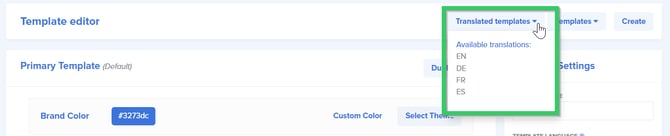
Note: Each time you click one of the translated template options from the drop-down, a new template will be created.
There are additional language options you can select in Template Settings.
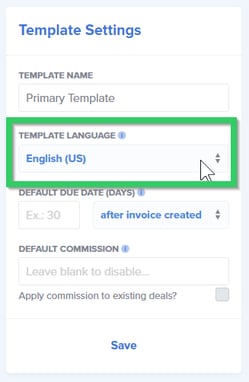
As not all sections are automatically translated by default, be sure to check your templates, quotes, and invoices to be sure text appears in your desired language. You may need to edit some sections manually.
To learn more about what you can do with templates, check out these resources.
Currency
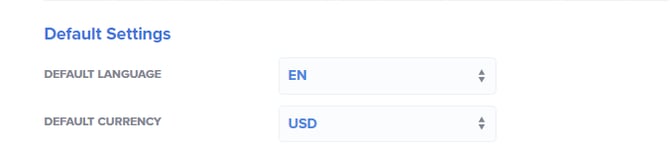
The currency of the deal is determined either by the deal currency in your CRM or by your default currency in Paycove. The Paycove setting for default currency is located in the same place as that of default language. These can be found by navigating to your Account page and looking in the Default Settings section. Remember to save your changes if you make any.
Note: Paycove unfortunately no longer supports Japanese Yen, so customers will need to use a different currency to make payments directly through Paycove. If absolutely necessary, a customer can pay with Yen outside of Paycove, and the user could then manually mark the invoice as "Paid."