![paycove_logo_explore_nautical_wide-08.svg]](https://help.paycove.io/hubfs/Imported%20images/paycove_logo_explore_nautical_wide-08.svg)
How does it work?
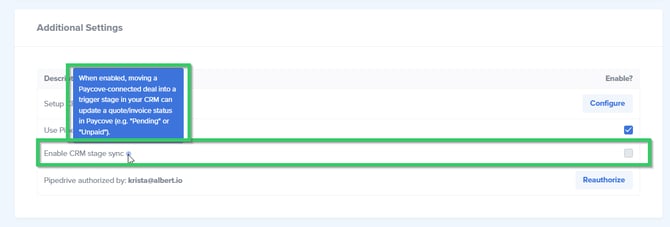
Checking this setting gives you the "full" automation experience. It allows your quotes/invoices to automatically move around between different statuses (such as a quote converting to an invoice, or an invoice going from "unpaid" to "paid") upon entering the correct trigger stage. To enable it, check the box and click Save Changes at the bottom of the page. Note that the feature works slightly differently for Pipedrive versus HubSpot.
Pipedrive
The below image is from an account connected to Pipedrive. As the Info icon states, "When enabled, moving a Paycove-connected deal into a trigger stage in your CRM can update a quote/invoice status in Paycove (e.g. "Pending" or "Unpaid")
HubSpot
As the Info icon states, "When enabled, moving any deal into a trigger stage in your CRM can create or update a quote/invoice in Paycove (e.g. "Pending" or "Unpaid"). Paycove can also update the deal stage to match your pipeline settings when a payment or invoice is paid/unpaid."
Why would you potentially not want to check this setting?
You may want to leave this setting unchecked if you'd like to be able to create a quote or an invoice in whatever CRM stage, but you don't want the Paycove status (e.g. “Pending” or “Unpaid”) to update automatically. For example, if you are using pipelines to automate invoice creation based on a stage, but you don’t want invoices to automatically update in Paycove when you move them to another stage, then you would want to keep the pipeline turned on, but have this setting unchecked.