---
title: How does Paycove work?
description: A simple overview and visual showing how Paycove connects with your CRM and other systems.
---
[Skip to content](https://help.paycove.io/knowledge/how-does-paycove-work#main-content)
[Contact us](https://help.paycove.io/knowledge/kb-tickets/new)
[![paycove\_logo\_explore\_nautical\_wide-08.svg\]](https://help.paycove.io/hubfs/Imported%20images/paycove_logo_explore_nautical_wide-08.svg)](https://www.paycove.io/)
- [FAQs](https://help.paycove.io/knowledge/frequently-asked-questions)
- [Help Articles](https://help.paycove.io/knowledge/help-articles)
Open main navigation
Close main navigation
- [FAQs](https://help.paycove.io/knowledge/frequently-asked-questions)
- [Help Articles](https://help.paycove.io/knowledge/help-articles)
- [Contact us](https://help.paycove.io/knowledge/kb-tickets/new)
- [Go to paycove.io](https://www.paycove.io/)
[Go to paycove.io](https://www.paycove.io/)
Hi there. How can we help you?
- There are no suggestions because the search field is empty.
1. [Help Center](https://help.paycove.io/knowledge)
2. [Frequently Asked Questions](https://help.paycove.io/knowledge/frequently-asked-questions)
3. [Integrations](https://help.paycove.io/knowledge/frequently-asked-questions#integrations)
# How does Paycove work?
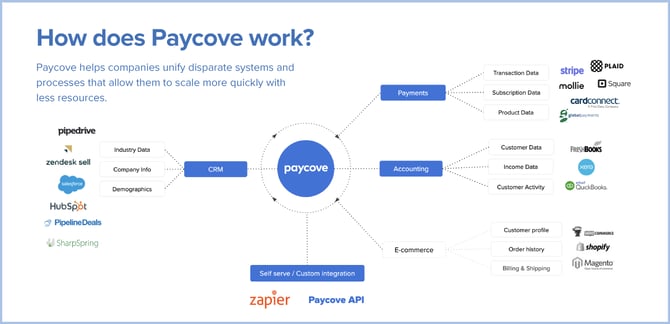
Paycove makes quoting and invoicing easy by connecting with your CRM - and accounting software, if you use it - helping you streamline your sales process from quote to payment. Since a flowchart is worth 1000 words, here is a visual of how Paycove acts as a unifier and communicates with the other systems.
[](https://help.paycove.io/hubfs/how-paycove-works.png)
- [Help Articles](https://help.paycove.io/knowledge/help-articles#main-content)
- [Getting Started and Integrations](https://help.paycove.io/knowledge/help-articles#getting-started-and-integrations)
- [Customizing Templates](https://help.paycove.io/knowledge/help-articles#customizing-templates)
- [Managing Quotes and Invoices](https://help.paycove.io/knowledge/help-articles#managing-quotes-and-invoices)
- [Products and Subscriptions](https://help.paycove.io/knowledge/help-articles#products-and-subscriptions)
- [Payments, Taxes, and Fees](https://help.paycove.io/knowledge/help-articles#payments-taxes-and-fees)
- [Account Settings](https://help.paycove.io/knowledge/help-articles#account-settings)
- [Other Help Articles](https://help.paycove.io/knowledge/help-articles#other-help-articles)
- [Frequently Asked Questions](https://help.paycove.io/knowledge/frequently-asked-questions#main-content)
- [Managing Quotes and Invoices](https://help.paycove.io/knowledge/frequently-asked-questions#managing-quotes-and-invoices)
- [Integrations](https://help.paycove.io/knowledge/frequently-asked-questions#integrations)
- [Payments](https://help.paycove.io/knowledge/frequently-asked-questions#payments)
- [Account Settings](https://help.paycove.io/knowledge/frequently-asked-questions#account-settings)
- [Pricing and Plans](https://help.paycove.io/knowledge/frequently-asked-questions#pricing-and-plans)
- [Other](https://help.paycove.io/knowledge/frequently-asked-questions#other)
[](https://www.paycove.io/)
[mailto:support@paycove.io](mailto:support@paycove.io)
Copyright © 2026, Paycove