![paycove_logo_explore_nautical_wide-08.svg]](https://help.paycove.io/hubfs/Imported%20images/paycove_logo_explore_nautical_wide-08.svg)
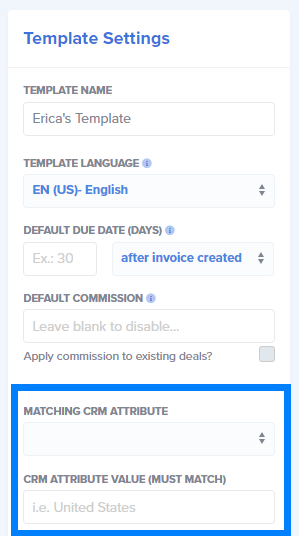
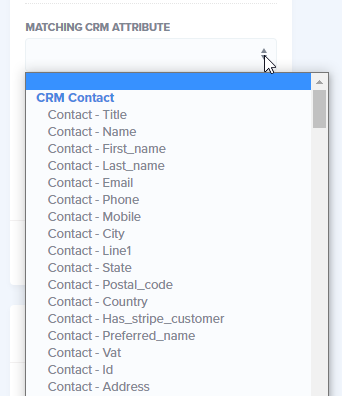
Selecting an Attribute to Match
Entering a CRM Attribute Value
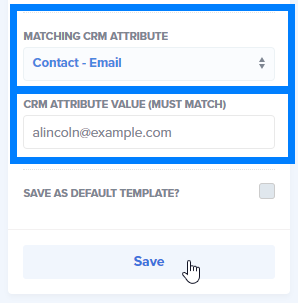
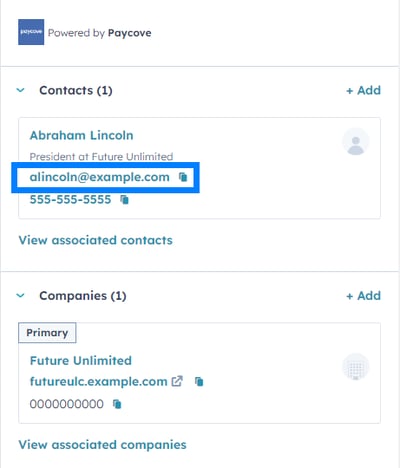
Once you've chosen the attribute that you'd like to be matched, fill out the section just below it titled CRM Attribute Value. This means that you'll need to type in the exact name, billing address, email address, product code, etc. that you would like to be used as a reference for this specific template. As the title states, the wording and spelling must match exactly. (We've entered the particular contact's email address in this example.) Once you're done, do NOT save this as the default template. Click Save.
Learning to match CRM attributes within your templates will open up a lot of possibilities in terms of automation, and can result in more organized, streamlined invoicing for you.
Feel free to reach out to us at support@paycove.io if you have questions or need assistance settings things up!