---
title: Why is there a Plaid error message when trying to make a bank transfer or ACH payment?
description: Support for Plaid has been recently deprecated, and so it will no longer work for bank transfers and ACH payments. You can now use Stripe Elements instead.
---
[Skip to content](https://help.paycove.io/knowledge/plaid-unsupported#main-content)
[Contact us](https://help.paycove.io/knowledge/kb-tickets/new)
[![paycove\_logo\_explore\_nautical\_wide-08.svg\]](https://help.paycove.io/hubfs/Imported%20images/paycove_logo_explore_nautical_wide-08.svg)](https://www.paycove.io/)
- [FAQs](https://help.paycove.io/knowledge/frequently-asked-questions)
- [Help Articles](https://help.paycove.io/knowledge/help-articles)
Open main navigation
Close main navigation
- [FAQs](https://help.paycove.io/knowledge/frequently-asked-questions)
- [Help Articles](https://help.paycove.io/knowledge/help-articles)
- [Contact us](https://help.paycove.io/knowledge/kb-tickets/new)
- [Go to paycove.io](https://www.paycove.io/)
[Go to paycove.io](https://www.paycove.io/)
Hi there. How can we help you?
- There are no suggestions because the search field is empty.
1. [Help Center](https://help.paycove.io/knowledge)
2. [Frequently Asked Questions](https://help.paycove.io/knowledge/frequently-asked-questions)
3. [Payments](https://help.paycove.io/knowledge/frequently-asked-questions#payments)
# Why is there a Plaid error message when trying to make a bank transfer or ACH payment?
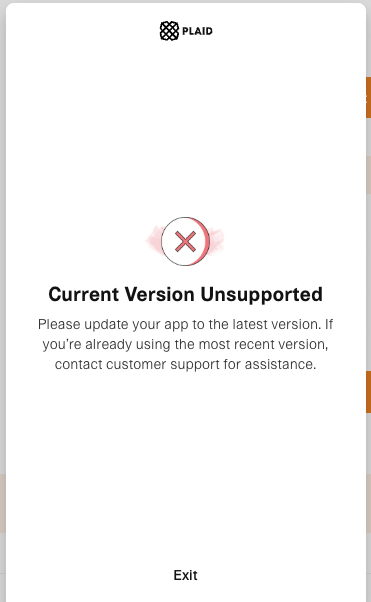
The reason for this error message is that support for Plaid has been recently deprecated, and so it will no longer work for payments. Now, what you can do to accept bank transfers and ACH payments is switch to **[Stripe Elements](https://help.paycove.io/knowledge/accepting-payments-with-stripe)**.
To switch to Stripe Elements, go to the **[Payments](https://paycove.io/payment-methods)** page, and select Elements, as shown below.
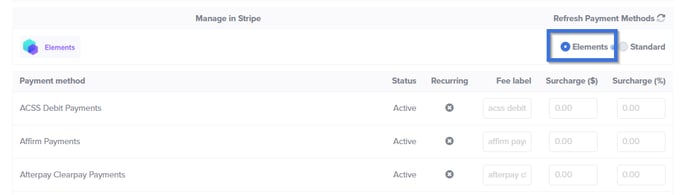You can add fee labels or surcharges here. Be sure to click "Save" further down on the page when you're done.
Once Stripe Elements has been enabled, all of the available payment methods from your Stripe Dashboard will appear with options to enable/disable.
To learn more about setting up Stripe Elements, take a look at the **[full article](https://help.paycove.io/knowledge/accepting-payments-with-stripe)**!
**Note:** Please be aware that Stripe Elements does not currently support Subscriptions, and we are in the process of completing this update to ensure full compatibility.
- [Help Articles](https://help.paycove.io/knowledge/help-articles#main-content)
- [Getting Started and Integrations](https://help.paycove.io/knowledge/help-articles#getting-started-and-integrations)
- [Customizing Templates](https://help.paycove.io/knowledge/help-articles#customizing-templates)
- [Managing Quotes and Invoices](https://help.paycove.io/knowledge/help-articles#managing-quotes-and-invoices)
- [Products and Subscriptions](https://help.paycove.io/knowledge/help-articles#products-and-subscriptions)
- [Payments, Taxes, and Fees](https://help.paycove.io/knowledge/help-articles#payments-taxes-and-fees)
- [Account Settings](https://help.paycove.io/knowledge/help-articles#account-settings)
- [Other Help Articles](https://help.paycove.io/knowledge/help-articles#other-help-articles)
- [Frequently Asked Questions](https://help.paycove.io/knowledge/frequently-asked-questions#main-content)
- [Managing Quotes and Invoices](https://help.paycove.io/knowledge/frequently-asked-questions#managing-quotes-and-invoices)
- [Integrations](https://help.paycove.io/knowledge/frequently-asked-questions#integrations)
- [Payments](https://help.paycove.io/knowledge/frequently-asked-questions#payments)
- [Account Settings](https://help.paycove.io/knowledge/frequently-asked-questions#account-settings)
- [Pricing and Plans](https://help.paycove.io/knowledge/frequently-asked-questions#pricing-and-plans)
- [Other](https://help.paycove.io/knowledge/frequently-asked-questions#other)
[](https://www.paycove.io/)
[mailto:support@paycove.io](mailto:support@paycove.io)
Copyright © 2026, Paycove